Accessibility in Underwater Arcade Games
Five things a small arcade game can do for accessibility without a budget, and how to check whether a game you are about to play does them.

Small arcade games have no accessibility budget, no dedicated specialist and no time. That is the usual excuse, and it is mostly wrong — the measures that matter most in a game like this cost hours rather than weeks, and several of them make the game better for everyone.
This article covers five things a small canvas game can do, how to check whether a game you are about to play does them, and where the genuine limits are.
1. Never signal state by colour alone
The most common failure and the easiest to fix.
Colour vision deficiencies affect a substantial minority of players, and beyond that, colour is simply unreliable at speed, at small sizes, on a phone in sunlight, or on a cheap display. A distinction that only exists in hue is a distinction some of your players will not see and all of your players will sometimes miss.
The W3C's accessibility guidelines address this directly as a success criterion — use of colour — linked at the foot of this page. The practical version is: every colour-coded distinction needs a second channel, which is usually shape or text.
Concretely, on this site:
- Every meter — air, survey time, hull — shows a number beside the bar. The bar changes colour when it runs low and the number is there regardless.
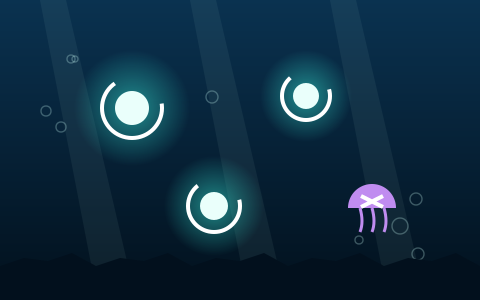
- In Underwater Reflex, jellyfish you must not tap carry a white cross. They are also purple, and the cross is what you actually read at speed.
- In Ocean Rescue Challenge, the rescue marker is a ring labelled RESCUE and debris is a square labelled DEBRIS. Shape first, text second, colour third.
- In Marine Match Challenge, every face-up card prints the name of its symbol, and the twelve symbols have deliberately distinct silhouettes.
Worth noting that the last one improves the game for everybody: a written name is considerably easier to hold in memory than a small picture, so the accessibility measure is also the best memory aid in the game.
2. Full keyboard play, including in pointer games
Directional games get keyboard support for free. The interesting case is games that are fundamentally about pointing.
Underwater Reflex is a reaction game where you tap targets, which sounds inherently mouse-only. It has an arrow-key reticle moving at a fixed 520 pixels per second, with Space to tap. Marine Match Challenge has a card cursor that moves with the arrow keys and wraps at the board edges.
Building those is not free — each is a real control mode that needs tuning — but it is hours, not weeks. And in Marine Match's case the keyboard path turns out to be faster on the largest board, because a wrapping cursor crosses from the last column to the first in one press. Another example of accessibility work improving the game generally.
3. Instructions readable before play
A subtler one that matters more than it sounds.
If the only explanation of a game's rules is a timed overlay, or text drawn inside the canvas, then anyone who reads slowly, uses a screen reader, or enlarges text is excluded from understanding the game before it starts.
Two measures fix it. First, the start panel on every game here is real HTML and stays up until you choose to begin — nothing is timed before you press Start, and there is no countdown after. Second, the full instructions, controls tables and tips live in the page below the game, as ordinary text a browser can enlarge, reflow or read aloud.
The same reasoning puts the score bar in HTML rather than drawing it on the canvas. Canvas text does not scale with browser zoom, cannot be selected, and is invisible to assistive technology. HTML text does all of that correctly by default.
4. Pause without penalty
Every game here pauses with P or Esc, and pauses itself when the page becomes hidden.
That second behaviour matters for anyone who cannot guarantee uninterrupted attention — which is a much larger group than "people with disabilities" and includes anyone with a phone, a doorbell or a child.
The related principle: no game should require sustained input to stay alive. All the games here apply a small buoyancy force so idling drifts you gently rather than killing you, which means letting go of the controls is never immediately fatal.
5. Respect reduced-motion preferences
Operating systems expose a "reduce motion" setting, and browsers pass it to web pages. Honouring it is a few lines of CSS.
On this site, all page-level animation — transitions, hover effects, smooth scrolling — is disabled when that preference is set.
The honest limitation: the games themselves are motion. A scrolling canyon cannot be made still and remain the same game. What can be done is to avoid gratuitous motion elsewhere: no animated page backgrounds, no parallax, no decorative movement outside the playfield. That is a real limit and it is better to state it than to imply a level of accommodation that does not exist.
How to check a game yourself
Five tests, each taking under a minute, on any browser game.
Tab through the page. Can you reach every control with the keyboard? Is there a visible focus indicator? If focus disappears, the page is not keyboard-navigable.
Try playing without the mouse. Start a game and try to control it with arrow keys and space. If nothing happens, the game requires a pointing device.
Zoom to 200%. Does the text stay readable and the layout intact, or does it overflow? Text drawn on a canvas will not scale at all, which is a quick tell.
Look for colour-only distinctions. Squint at the game. If two important things become identical, colour is doing work it should not be doing alone.
Check the instructions. Are they real text on the page, or only inside the canvas? If you cannot select them with your cursor, assistive technology cannot read them either.
The honest limits
Worth stating plainly rather than overclaiming.
A canvas game is fundamentally visual. Screen reader users can read every instruction, control table, tip and FAQ on these pages, and can operate every button — but the playfield itself is a visual space, and there is no meaningful audio or textual representation of "a canyon narrowing ahead of you". An aria-live region announces state changes such as game over and new records; it cannot narrate gameplay.
Similarly, the reaction-based games have a genuine speed floor. The fade window in Underwater Reflex bottoms out at 0.62 seconds, and there is no difficulty setting to change that. Some games in any library will not suit some players, and the honest response is to say which ones rather than to claim universal accessibility.
The realistic goal for a small game site is: nothing excludes anyone unnecessarily, every instruction is readable by everyone, and the games that can be played without a mouse or without colour vision, are.
Key takeaways
- Never signal state by colour alone — pair every colour cue with a shape or a number.
- Provide a full keyboard path, including in pointer-driven games.
- Keep instructions and HUD text in HTML, not drawn on the canvas.
- Pause freely and never require sustained input to stay alive.
- Honour reduced-motion for the page, and be honest that the game itself is motion.
- Several of these — labels, keyboard cursors — make the game better for everyone.
- State the limits rather than claiming universal accessibility.
Frequently asked questions
Can I play these underwater games without a mouse?
Yes, all of them. Directional games use the arrow keys or WASD. The two pointer-driven games have full keyboard paths — an aiming reticle in Underwater Reflex and a wrapping card cursor in Marine Match Challenge.
Are these games playable with colour vision deficiency?
Yes. No game state on this site is signalled by colour alone: meters show numbers beside their bars, jellyfish carry a white cross, rescue markers are rings while debris are squares, and every matching card prints the name of its symbol.
Do the games work with a screen reader?
The pages do — all instructions, control tables, tips and FAQs are real text, and every button is properly labelled. The playfield itself is visual, and while an aria-live region announces state changes such as game over, it cannot narrate gameplay.
Can I slow the games down?
No. There is no difficulty setting or speed control, and the reaction-based games have genuine speed floors. Some games in this library will not suit every player, which is worth saying plainly rather than implying otherwise.
How can I check whether another browser game is accessible?
Tab through the page and watch for a visible focus indicator; try playing with only the keyboard; zoom to 200% and see whether text reflows; squint to check nothing depends on colour alone; and try selecting the instructions with your cursor — if you cannot, assistive technology cannot read them.
Where to go next
The controls guide lists every input in every game, including the keyboard paths. For the input comparison, keyboard vs touch.
And for how symbol design supports both accessibility and readability, marine creature games.
References
Links open on the publisher's own site. Factual claims about real oceans, depths and marine life on this page are attributed to these sources; game mechanics described on this page come from the game code on this site.